Appearance
Monitors
Data quality in AIMO is expressed as monitors: named checks tied to a table, usually to one or more columns. Every monitor is a family spec — a small, typed description of what is measured: an aggregation shape (the family) built around a typed row condition that identifies the rows of interest. The agent does not run arbitrary SQL from the UI; it compiles these structured specs into a known family of aggregate queries. Which monitors apply to a table, and with what conditions, is determined by AIMO during onboarding — not chosen from a catalog in the UI.
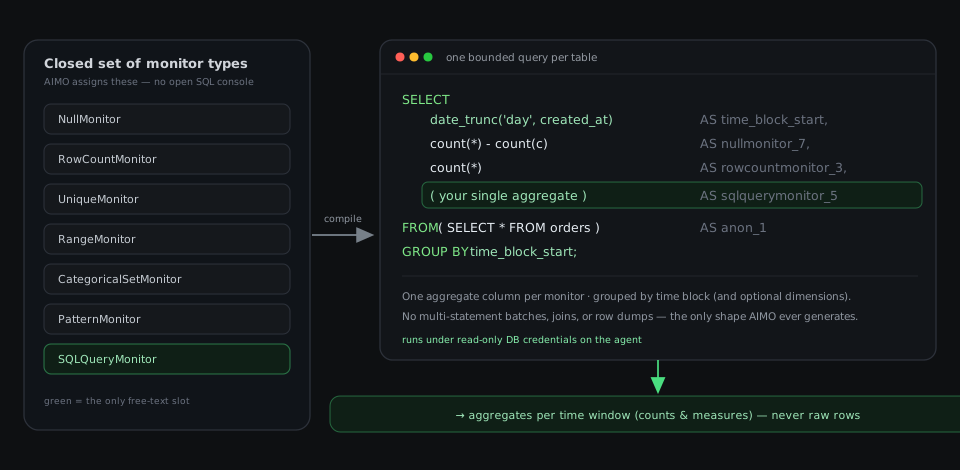
custom family is the only free-text slot, and even it is one approved aggregate inside the same fixed shell.The diagram captures the central idea: a closed algebra of monitor families on the left becomes one grouped aggregate query on the right. Each active monitor contributes exactly one aggregate column; the query filters to a time block (and groups by optional dimensions) over a subquery of your table. The only place free text enters is the custom family, and it is still a single aggregate dropped into the same shape. The query runs under read-only database credentials and returns aggregates per time window — never raw rows.
The condition is the semantics
Because conditions are typed (is_null, out_of_range, not_in_set, …), the same structure that compiles into SQL also renders the human explanation: the monitor list shows "Out-of-range values in amount (outside 0 to 100)", the alert says what rule the rows broke, and each alert carries a copy-pasteable SELECT for the exact violating rows — which you run on your side; AIMO never executes it.
Why a strict algebra matters
AIMO uses a closed set of monitor families with typed conditions:
- Predictable database access — Each family maps to a constrained pattern: aggregates and conditional counts over reflected columns, not an open SQL console.
- Controlled commands — SQL is compiled from the specs by the platform, with the time-block filter and optional dimensions — reviewable shapes, not ad-hoc automation strings.
- Schema-backed definitions — Specs must conform to the family schemas. Free-form SQL appears only in the
customfamily and in explicitly marked expression fields, under strict shape rules: single expressions, no statements, validated by parsing to a syntax tree before any query is built.
In practice, the structured families cover almost everything: in AIMO's own generation evaluation across real tables, under 3% of generated monitors needed the custom slot.
Assignment and validation
The platform floor — Every table automatically gets a row count monitor (the volume baseline) and a missing-values check per column, authored deterministically by the platform. AI reviews the floor only for applicability (a column whose nulls are expected and meaningful is left unmonitored on that axis — with the reasoning recorded).
AI generation — AIMO then generates the table-specific monitors from its analysis of your schema and data: range and format checks, the table's uniqueness grain, cross-column consistency, and the business metrics worth watching. Generation samples more than once and de-duplicates by the spec's semantic identity, so coverage grows without duplicates. Every monitor it proposes is active from the start — you switch off anything you don't want.
Validation — Before monitors are production-ready, the agent runs Validate monitor artifacts: it compiles each spec and runs the same grouped query shape as production with a minimal read, so every condition and expression is proven against your schema and data.
AIMO assigns, the type system constrains, and your database confirms executability.
What appears in charts
Raw row payloads are not sent to AIMO for monitoring; the product works from aggregates per time window and optional dimensions. To inspect individual rows behind an alert, use the alert's violating-rows query in your own SQL client.
Monitor families
Configuration uses family; the UI shows friendly labels derived from the spec shape.
row_count
Total row count per time window — the volume baseline, authored by the platform for every table. Drops often indicate failed or partial loads; sharp growth may indicate duplication or runaway inserts.
count_where
Counts the rows matching a typed condition — the workhorse for row-level data quality. Condition kinds include:
| Condition | Counts rows where… |
|---|---|
is_null / not_null | the column is missing / present |
out_of_range / in_range | the value falls outside / inside literal bounds |
not_in_set / in_set | the value is outside / inside an allowed label set |
not_matches / matches | the text fails / fits a regular expression |
length_out_of_range | the text length falls outside bounds |
compare | a column compares against a literal or another column (cross-column consistency) |
and / or / not | a combination of the above holds |
raw | a single row-level boolean SQL expression holds (validated; no aggregates, subqueries, or statements) |
Bounds and sets are literal constants chosen by domain reasoning — not dynamic SQL in condition fields.
ratio
The fraction of rows matching a condition — e.g. the share of cancelled orders — so varying data volumes don't hide a drift. An optional denominator condition restricts the base population.
share
A value-weighted proportion: one segment's share of a summed quantity, such as a category's share of total production volume.
agg
A statistical aggregate of a numeric expression per window: sum, average, min/max, standard deviation, variance, median, or a percentile — optionally restricted to a condition-matching subset. This is drift monitoring of the quantity itself.
spread
The width of the value range (max − min) per window — for quantities that should stay within a narrow band.
distinct_count
The number of distinct values or combinations per window — cardinality monitoring, where a drop or spike signals missing or unexpected data.
duplicates
Duplicate rows over a key that should stay unique — the table's grain. Accepts 1–N key columns for composite keys (e.g. one row per company_id per price_date); rows with a NULL key column are ignored, and duplicates are counted within each time block. An inverted mode tracks distinct combinations instead.
custom
Evaluates one custom aggregate expression as SQL, embedded in the same grouped monitoring query as other monitors — for metrics no structured family expresses, such as arithmetic over several aggregates.
Guardrails — The expression must be a valid single scalar aggregate for your dialect — not a full SELECT, CTE, join graph, or multiple aggregates. This is not an open SQL shell: one approved slot in a fixed outer shape, with static validation before anything is built.
The authoritative protection is that the agent connects with read-only database credentials, so a malformed expression cannot write or drop data — see Security. As defense in depth on top of that role, every SQL fragment (the custom aggregate, raw conditions, and expression fields) is parsed to a syntax tree and rejected unless it is a single read-only expression: no extra statements, no SQL comments, no subqueries, CTEs, set operations, window functions, or DML/DDL, and none of a small set of dangerous functions (sleeps and other denial-of-service primitives, filesystem reads, cross-database/network calls, OS execution). Parsing rather than keyword-matching means a forbidden word inside a string literal (e.g. WHEN status = 'DELETED') is treated as harmless data, while a genuine subquery or unsafe call is caught however it is spelled.
Summary
| Family | In brief |
|---|---|
row_count | Table size (volume baseline, platform-authored) |
count_where | Rows breaking a typed condition |
ratio | Fraction of rows matching a condition |
share | One segment's share of a summed quantity |
agg | Sum / average / extreme / spread statistic / percentile |
spread | Width of the value range (max − min) |
distinct_count | Distinct values or combinations |
duplicates | Duplicate rows over a unique key |
custom | One custom aggregate in the fixed shell |
For job types that execute these definitions, see Operations.