Appearance
Registration
An agent proves its identity to AIMO with an asymmetric keypair. Two ways to bind the keypair to an agent record:
- Register via agent — Run the agent image’s
registercommand with a short-lived registration token from the web UI. - Supply a public key — Paste a public key when you create the agent; you keep the private key in your own systems.
Both paths end the same way: AIMO stores the public key; the running agent uses the private key to obtain JWTs. Day-to-day commands and environment variables are in Agent CLI.
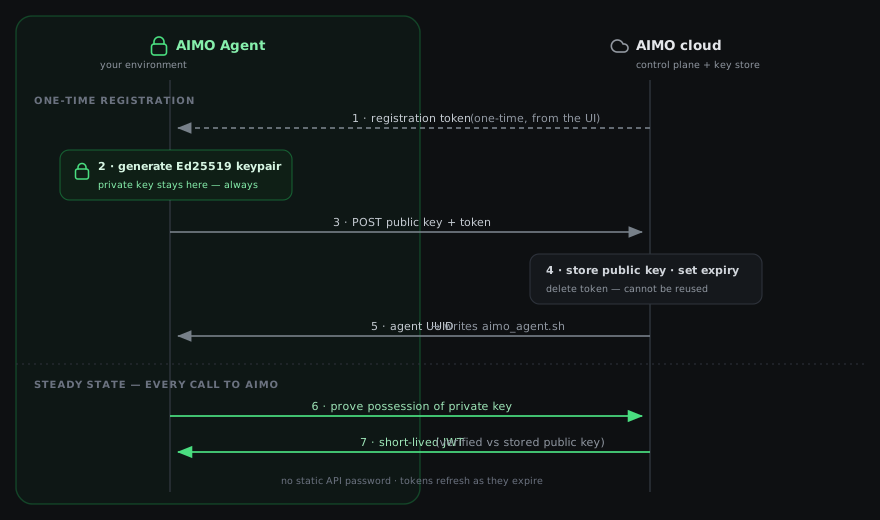
Read the diagram top to bottom. The upper half is the one-time pairing that happens when you run register: a keypair is generated next to your agent, only the public key travels to AIMO, and the one-time token is consumed and deleted. The lower half is the ongoing pattern—there is no static API password, so for every REST or WebSocket call the agent proves it holds the private key and receives a short-lived JWT that AIMO checks against the stored public key. The sections below walk through each step.
Register via agent (registration token)
In Add agent, choose Register via agent. You set a name; you do not paste a public key. On create, AIMO allocates an agent UUID and stores a registration token (valid for one hour, keyed to that UUID). No key is attached yet—the key and its expiry are set when you run register.
The UI shows a Docker command that runs register with that token. Copy it from the UI rather than typing it: the image it names is the one built for the AIMO environment you are signed in to, and that image connects to that environment by default. Example (the production image; the dev environment hands out …/aimo/agent-dev:latest):
bash
docker run --pull always --rm -u "$(id -u):$(id -g)" -v ./:/app/data \
  rg.nl-ams.scw.cloud/aimo/agent:latest \
  register <REGISTRATION_TOKEN>
What register does
- Generates an Ed25519 keypair locally. The private key does not leave your environment until you decide where it lives.
- POSTs to
/agents/registrationwith the token, the base64-encoded public key, and its type. The server validates the token, attaches the public key, sets key expiry (server default), records registered at, stores the public key for authentication, and deletes the token so it cannot be reused. - Tests authentication by minting a JWT from
POST /agents/tokensand reports success or a warning. Registration still succeeds even if this check fails. - Writes
aimo_agent.shinto the mounted data directory (/app/datain the container → your host path when using-v ./:/app/data). If the directory is read-only,registerprints the script contents instead so you can save it yourself.
What aimo_agent.sh contains
A small bash script that:
- Exports
AIMO_AGENT_UUIDfrom the server response. - Exports
AIMO_AGENT_PRIVATE_KEY_B64(the generated private key). - Exports
AIMO_AGENT_PASSPHRASE(random hex by default) used to encrypt connection credentials in the CLI—you may replace it with a passphrase you manage. - Exports
AIMO_AGENT_HOSTandAIMO_AGENT_USE_TLS(matching the server you used when registering) so REST and WebSocket URLs agree. - Runs
docker runof the same imageregisterran from (its header names it and the server), with-v ./:/app/data, passes those env vars into the agent image, and forwards"$@"so you can run subcommands such asstart.
bash
chmod +x aimo_agent.sh
./aimo_agent.sh start
Treat aimo_agent.sh and anything containing AIMO_AGENT_PRIVATE_KEY_B64 as secrets.
Token visibility and rotation
The registration token is shown only once (at creation, as the UI notes) and expires after one hour. To register a new keypair later, use update agent key to request a fresh registration token, then run register again.
Supply a public key
In Add agent, choose Supply public key. You set a name and a TTL in days for the key, then paste a public key. The server’s parse_public_key logic accepts OpenSSH (ssh-ed25519 …, ssh-rsa …), PEM (-----BEGIN …), or raw base64 (with an optional type hint); both Ed25519 and RSA keys are supported.
AIMO stores the public key immediately and sets its expiry from the TTL you chose. No registration token. You generate the keypair outside the product, keep the private key in your vault, and configure AIMO_AGENT_UUID and AIMO_AGENT_PRIVATE_KEY_B64 for that agent.
Suited to HSMs, internal PKI, or config systems that provision keys without running register.
Choosing a path
| Register via agent | Supply public key | |
|---|---|---|
| Where the keypair is created | register CLI inside your run | You create it; only the public key is sent |
| First step | Docker register with token, then aimo_agent.sh or equivalent env | Configure UUID + private key; no register |
| Best when | You want a one-time token and a generated wrapper script | You must meet existing key custody or policy |
After registration, see Agent CLI and Operations for connections and the long-running agent process.