Appearance
Security
Security properties and controls for AIMO: where secrets live, how identity is proved, what crosses your network boundary, and what the platform does not do. Setup steps are in Getting started, Architecture, Registration, Agent CLI, and Operations.
Network boundary: no cloud path to your database
AIMO’s cloud coordinates the product and talks to the agent over an outbound connection from your environment. There is no supported path from AIMO to your databases—no firewall rules, reverse tunnel, or SQL port opened for the cloud. If policy allows nothing outbound at all, the whole platform can be deployed on-prem with an LLM you supply; the boundary described below then sits entirely inside your network.
- Outbound-only agent — The agent initiates TLS (or equivalent) toward AIMO. You do not publish databases or the agent to the public internet for normal operation.
- Jobs, not shells — Work dispatched to the agent is limited to a fixed set of job types (analysis, monitor calculation, validation, connection tests, and similar). The agent is not general-purpose remote execution for arbitrary cloud code. See Operations.
Credential use and query execution stay on infrastructure you control, beside your data.
Data leaving the perimeter: aggregates and metadata, not raw rows
Raw field values are not bulk-exported to AIMO for routine monitoring. What crosses the boundary is summarized: schema and profiling metadata, aggregates over time windows (counts, grouped monitor results), and similar bounded payloads. Charts and modeling use those aggregates, not row-level dumps. Even the custom monitor family returns a single aggregate per group, inside the same fixed query shell as other monitors. See Monitors.
Outlier detection runs on monitor time series and derived artifacts in AIMO after the agent has produced aggregates—not on a full copy of your raw tables. See Outlier detection.
Human users: sign-in to the web UI
Access uses passkeys (WebAuthn) only—password login is not available. After sign-in, AIMO uses a server-side session; API calls from the UI are authorized from that session, with account roles (viewer vs admin, etc.) where the product defines them.
Sign-in is provided by the AIMO deployment as delivered. Bring-your-own IdP (for example OpenID Connect) is not available today; it is planned for a future release.
Recovery (lost passkey) and new devices are your responsibility: register additional passkeys while you still have access. Use platform passkey sync where your devices support it.
Agent identity: registering the keypair
Each agent uses an asymmetric keypair. The CLI generates an Ed25519 keypair at registration. Registration binds that keypair to your account: AIMO stores the public key; the private key stays in your environment (unless you only supply the public key yourself). A short-lived, single-use registration token lets the CLI upload the public key once; the token is consumed as soon as the public key is accepted. See Registration. That flow is pairing only—not day-to-day authentication.
Agent JWTs: authenticating with the stored keypair
The running agent does not use a static API password. It keeps the private key (and related env, e.g. agent UUID) on disk or in the container. Whenever it calls AIMO (REST, job WebSocket), it signs a timestamped request with the private key and exchanges it for a short-lived JWT; AIMO verifies the signature against the stored public key and issues the token. The signature must be recent (the timestamp is checked within a few minutes), so a captured request cannot be replayed later. Tokens refresh automatically as they expire. The stored public key also carries an expiry: once it lapses, the token endpoint refuses to issue tokens until the key is renewed via key update or re-registration.
Rate limiting — The token endpoint applies per-IP limits (default on the order of 10 requests per minute); overloaded clients may see HTTP 429.
Agent WebSocket channel
The job channel requires a valid agent JWT before it carries work. Unauthenticated or invalid connections are closed.
Database credentials: encryption, storage, decryption
Connection credentials are never typed into the browser for storage. They are created through the agent CLI, encrypted before upload, and stored as ciphertext in AIMO’s database.
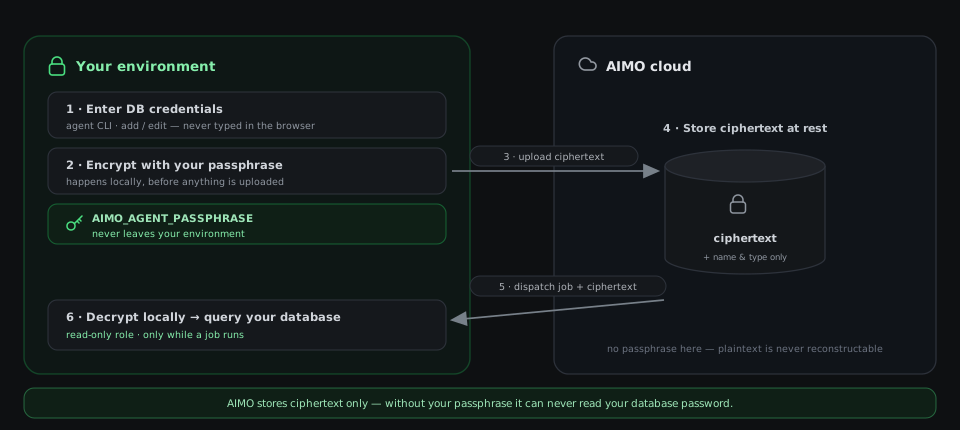
Follow the loop in the diagram: you enter credentials in the agent CLI, they are encrypted locally with AIMO_AGENT_PASSPHRASE, and only the ciphertext is uploaded. Encryption derives a key from the passphrase with scrypt and encrypts the credentials with AES-256-GCM; the stored blob carries only the KDF parameters, a random salt, a nonce, and the ciphertext—no key material. AIMO keeps that blob (plus a name and type) at rest. When work needs your database, AIMO hands the ciphertext back with the job, and the agent decrypts it on your side to run the query. Because the passphrase stays with you, the stored ciphertext is never a usable plaintext password in the cloud.
- At rest — AIMO stores only the ciphertext (plus metadata such as name and type). Decryption for database access happens on the agent when executing jobs, using the passphrase and keys available there.
- API responses — List/get APIs may return ciphertext to authorized clients. Without agent-side key material, that data is not usable as plaintext passwords.
The CLI’s show command prints non-secret fields for debugging; sensitive fields are masked. Agent REST operations that mutate connections require a valid agent JWT.
Read-only database access
The credentials you configure should belong to a read-only database role. The agent only ever reads—schema reflection, bounded sampling, monitor aggregates—and a read-only role is the authoritative guarantee that nothing AIMO runs can write to or drop data from your tables.
This matters most for the free-form SQL slots — the custom family's aggregate, raw conditions, and expression fields. The read-only role is the authoritative protection; on top of it, the platform applies defense in depth before any fragment reaches your database. It parses each fragment to an AST (dialect-agnostic) at the compile chokepoint — the same validation runs wherever a spec is deserialized — and accepts only a single read-only expression:
- One statement only — multiple statements (anything separated by
;) are rejected. - No structural escapes — subqueries, CTEs, set operations, window functions, and any DML/DDL (
INSERT,UPDATE,DELETE,DROP,CREATE,ALTER,MERGE, …) are rejected as node types in the parse tree, regardless of spelling. - No SQL comments — to prevent commenting out the surrounding query.
- No dangerous functions — a deny set covering sleep/denial-of-service, filesystem reads, network/cross-database egress, and OS-exec primitives (e.g.
pg_sleep,dblink,xp_cmdshell) is rejected.
Because checks run on the parsed AST, a keyword that appears as a string literal or quoted identifier (e.g. WHEN status = 'DELETED') is harmless and accepted. See Monitors.
Job payloads: typed, bounded work only
Work must deserialize into known job models. Unknown or malformed payloads are rejected. Each job carries structured fields (credential references, table IDs, time ranges, monitor definitions)—not executable scripts. That aligns with the strict monitor type system: SQL on your database is generated from validated monitor definitions, not unconstrained strings in the envelope. See Operations and Monitors.
Operational hygiene
aimo_agent.shand private keys — Treat as secrets: restrict filesystem permissions, avoid committing to version control, rotate via key update / re-registration when policy requires.- Registration tokens — Treat like one-time passwords: short-lived, shown only at creation as documented in the UI.
- TLS — Use HTTPS/WSS between agents and AIMO in production on untrusted networks.
For diagrams, see Architecture.